Can It Really Make 60 Gallons a Day, or Is That Just the Air Talking?
Introduction
Picture this: a box in your home quietly pulling water out of the air like it’s got a grudge against bottled water. No pipes, no rain, no deals with mysterious water delivery men named Gary. Just… air in, water out.
That’s the promise of the Aqua Tower Atmospheric Water Generators, a DIY system marketed not as a machine, but as a downloadable instruction manual that claims you can build one—for less than the cost of a supermarket run and a modest lapse in judgment at the power tool aisle.
According to its creator (a farmer with an engineering-minded friend and, apparently, a strong sense of meteorological optimism), you can pull up to 60 gallons of clean water per day out of thin air. Which sounds impressive, unless you live in the kind of climate where even houseplants sigh audibly.
This review sets out to investigate that claim, not with wild speculation, but with a rational, slightly raised eyebrow and a few mugs of tea. We’ll break down what this thing is, how it allegedly works, and whether your garage is about to become a hydration hub or just slightly damper.
What Exactly Is the Aqua Tower?
Let’s begin with what the Aqua Tower isn’t: it’s not a machine you buy in a box. It does not arrive at your doorstep accompanied by a knowing wink from a delivery driver and a faint sound of internal condensation.
What you do get is a digital guide—a series of blueprints, parts lists, and video tutorials promising to show you how to construct an atmospheric water generators (AWG) for under $200, using readily available materials and what’s described as “no special skills.”
In other words: it’s a make-your-own water wizardry kit, provided you can read instructions, follow basic wiring diagrams, and know which end of a screwdriver isn’t the handle.
The core premise? Turn air into water using condensation. Or as the Aqua Tower might put it: “Build a machine that makes the weather regret being so humid.”
How It’s Supposed to Work:
A Brief, Slightly Damp Overview
The process here is elegant in theory and fairly well-worn in practice. If you’ve ever owned a dehumidifier or accidentally left a cold can of soda in a warm room, congratulations—you’ve already witnessed the central mechanic in action.
Here’s the idea, in practical terms:
Air is pulled in via a fan and cleaned of large dust particles and airborne drama.
That air is cooled below the dew point, typically by passing it over refrigerated coils.
Water condenses on the coils, like morning dew or regret.
The collected liquid is run through carbon filters and UV sterilizers, to ensure it’s fit for human consumption and not, say, a small algae colony.
Finally, it drips into a tank, where it awaits your parched enthusiasm.
The Aqua Tower guide claims that, when properly assembled, your DIY water-breather can produce dozens of gallons a day under optimal conditions. The operative word being “optimal,” which we will return to frequently—like a cat to the warm laundry pile.
👉 Want to see how it works, what it costs, and if it’s actually worth the effort?
Download the guide– and get one step closer to telling your water bill where it can go.
The 60 Gallon Claim: Technically True (In Much the Same Way That You Could Eat 60 Pancakes in a Day)
Let’s address the headline number. The idea of producing 60 gallons of water per day from air is exciting. It’s the sort of number that makes you pause mid-scroll and think, “Well, that solves my water problems forever and possibly makes me mayor.”
But there’s a quiet caveat—“up to 60 gallons per day, depending on humidity.” Which is a bit like a hotel advertising free breakfast that only exists if you brought the cereal yourself.
Under tropical, rainforest-like conditions (think 80°F+ and 70% humidity), and with a large, energy-hungry condenser system, you might indeed get close to that. But unless you’re living inside a greenhouse or the armpit of summer, you’re far more likely to see 5–20 gallons per day.
Still respectable. Still useful. Just… not miraculous. And certainly not magic.
🌬️ How Atmospheric Water Generators Actually Work
(Or: How to Convince Air to Be Less Vague About Its Water Content)
Atmospheric Water Generation (AWG) might sound futuristic, but it’s really just condensation with a decent publicist.
The basic idea is that air—despite its apparently dry demeanor—contains water vapor. Quite a lot of it, actually. The trick is getting that vapor to commit to becoming actual water, and not just hang around being moody and humid.
Here’s the play-by-play:
A fan pulls warm, humid air into the machine. Think of this as the “Hello, may I take your coat?” stage.
The air meets a cold surface—typically refrigerated metal coils—which causes it to lose confidence and drop its moisture in the form of condensation.
That condensation is caught in a tray or tank.
The water is passed through a series of filters, usually carbon-based, to remove any unpleasant flavors, smells, or ghost particles.
Then it gets zapped by UV light, just in case any microbes had plans to set up shop.
And finally, you get water. Crisp, clean, and relatively guilt-free.
If you’re thinking this sounds suspiciously like a dehumidifier that studied abroad and came back “changed,” you’re not wrong.
The main difference is that AWGs are built with drinking in mind, not just removing dampness from the spare room. That means stricter filtration, better water-quality safeguards, and the expectation that someone will eventually ask, “Would you like a glass?”
📈Illustration of a fictional atmospheric water generator
📊 How Much Water Can You Really Get From Thin Air?
Now we get into the numbers—where science meets disappointment, unless you live in a jungle.
How much water an AWG can make depends on a few things:
Temperature: Warmer air holds more moisture. Cold air is stingy.
Humidity: The higher the relative humidity, the more water there is to extract. Below 30%, your AWG starts sulking.
Airflow: More air = more water. But also more fan noise, more energy use, and possibly more arguments with your electricity meter.
Cooling power: The colder those coils can get, the more moisture they can wring from the air. It’s basically emotional manipulation, but with physics.
If you’re in a place where it’s 80°F and 70% humidity, you’re golden. Your machine is going to be smug, productive, and possibly too proud of itself. You might get 10–20 gallons, maybe more.
If you’re in the high desert during a cold snap? You’ll be lucky to get a cup and a sense of moral superiority.
⚙️ So Can a DIY Machine Match a $30,000 Commercial Unit?
Not really. But also: maybe sort of, if you squint.
To put things in perspective:
Watergen GEN-M1, a professional-grade machine the size of a small refrigerator, claims up to 58 gallons per day. It’s sleek, efficient, and costs about as much as a used car that still holds a grudge, $30,000 -$40,000.
H2O Machine, a more accessible home model, offers 15 gallons/day and runs on about 1,000 watts—enough to make your electric bill send you a passive-aggressive email.
Aqua Tower, in comparison, asks you to scrounge up parts for under $200 and promises similar results “under the right conditions.” Which, as we’ve noted, include high humidity, warm air, and a small herd of encouraging weather spirits.
Realistically, a well-built DIY unit might net you 5 to 20 gallons per day, depending on climate, parts quality, and whether the coils feel like cooperating. It won’t replace Niagara Falls, but it might keep you hydrated during a plumbing rebellion.
⚡ Energy: The Invisible Ingredient in Every Glass of Air-Water
Let’s be clear: making water from air isn’t magic. It’s electricity in disguise.
The Aqua Tower, like all AWGs, is essentially a water distillery for the sky—and distilleries, as any brewer or bonded wizard will tell you, are power-hungry beasts. To cool large volumes of air and squeeze the moisture out of them, you need compressors, fans, pumps, and the occasional guilty conscience about your utility bill.
Here’s what that might look like:
A medium-efficiency AWG producing 15 gallons per day can draw 1,000 watts or more, running most of the day.
If you extrapolate to 60 gallons, you’re looking at something in the range of 4,000 watts continuously, or about 100 kilowatt-hours per day.
To put that in more relatable terms, that’s the energy equivalent of running:
Four window AC units,
Or a small blacksmith forge,
Or a modest time machine (though results may vary).
And if you’re thinking, “But I’ll just run it on solar!”, then yes, good idea. Provided you also have:
Several kilowatts of solar panels,
A battery bank the size of a garden shed,
And weather that doesn’t immediately sabotage your optimism.
This isn’t to say it can’t be done. It can. But it’s not exactly “plug it in next to the toaster” simplicity. You’ll need to plan your power usage like someone prepping for an enthusiastic but unpredictable house-guest.
Illustration of a fictional atmospheric water generator
🌦️ Climate Conditions: Where Air-Water Dreams Go to Dry
Humidity is the secret sauce here. Unfortunately, it’s also the one ingredient that doesn’t arrive in a box.
Your output depends almost entirely on where you live, and whether your air is the sort that gives freely, or needs bribing with a thunderstorm.
Here’s how locations break down:
Ideal: Tropical and subtropical areas with high humidity year-round. Florida, the Amazon, that one greenhouse your aunt keeps locked.
Mediocre: Temperate regions with seasonal humidity. Great in summer. Winter? Your machine might need a hot water bottle and a pep talk.
Challenging: Desert or alpine environments with low humidity. You can still run it, but you’ll mostly be collecting sighs and disappointment.
And don’t forget temperature—cold air holds less moisture, and your machine will have to work harder to wring it out. It’s like trying to squeeze juice from a raisin.
Indoor setups also have a limit: if the air’s being recirculated and dried out by the machine, the efficiency drops off quickly unless you introduce fresh air. It’s a bit like breathing the same joke repeatedly—it gets stale fast.
Challenging Alpine: Very Low ( Not Recommended )
Illustration of a fictional atmospheric water generator
Challenging: Desert: Low Yield
Illustration of a fictional atmospheric water generator
Mediocre: Temperate regions
Illustration of a fictional atmospheric water generator
Ideal: Tropical and subtropical areas
Illustration of a fictional atmospheric water generator
🧰 What’s Actually Inside This Thing?
The DIY Anatomy of a Water-Summoning Box
Since the Aqua Tower is a guide, not a box shipped with “some assembly required” but a blueprint for hopeful tinkerers, you’ll be sourcing your own parts. Fear not: most of them are readily available, reasonably priced, and already hiding in your garage pretending to be something else.
Here’s what you’ll likely need (and what each bit actually does):
1. Air Intake Fan
This is the part that coaxes the air inside, like a polite but persistent maître d’. It pulls ambient air through the system and helps maintain circulation over the cold coils. The guide recommends including a dust filter, which is wise—nobody wants their drinking water flavored like attic lint.
💡 You can salvage one from an old computer, air purifier, or your ambitions to build a homemade leaf blower.
2. Cooling Coils + Compressor
This is the heart of the operation. Or the cold, metal spleen, if you prefer a more accurate anatomy metaphor.
This component chills the air to its dew point, allowing water to condense. Most builds re-purpose a dehumidifier or window AC unit, which contains all the necessary compressor wizardry.
💡 Good news: If you can operate a screwdriver and not electrocute yourself, you’re halfway there.
3. Condensate Tray / Water Tank
As water drips from the coils, it needs somewhere to go. Enter: a tray, basin, or container of your choice. Fancy models include a float switch that shuts things off when full. Simpler ones rely on the “check it before it overflows” method of water management.
💡 Old plastic storage tubs work fine. Just don’t use anything that used to hold antifreeze or mystery paint.
4. Filtration & Sterilization
This is where science politely removes anything the air may have added that you didn’t ask for—dust, spores, lingering kitchen smells, and airborne hubris.
The Aqua Tower suggests a multi-stage filter system, typically:
Sediment filter (catches the chunky bits),
Carbon filter (improves taste and removes odor-causing compounds),
UV sterilizer (zaps bacteria and viruses with light, because it’s fun and effective).
💡 These can be sourced from aquarium stores, survival gear suppliers, or anywhere that sells equipment for people who own too many fish.
5. Pump or Spigot
Depending on how you’d like your water delivered—gushing forth heroically or trickling out thoughtfully—you may include a small pump. Or gravity can do the job, if your tank is elevated and patient.
💡 Aquarium pumps, RV water systems, or sheer determination are all fair game.
6. Frame and Housing
Everything must live somewhere. A wood or metal frame, old shelving unit, or re-purposed mini-fridge shell can make a decent home for your components. The word “tower” implies verticality, which helps with airflow and adds gravitas.
Just make sure it’s:
Stable
Sheltered (especially if outdoors)
Accessible for maintenance and ritual cursing
Illustration of a fictional atmospheric water generator
The guide insists assembly can be done in an hour. If that turns out to be true, it likely assumes:
You already own tools
You’ve already sourced all the parts
You don’t stop midway through to Google “can UV sterilizers make tea?”
All told, it’s a manageable weekend project—especially for anyone who enjoys turning scrap into function and has a healthy respect for extension cords.
✅ The Benefits (And Occasional Brilliance) of Building the Aqua Tower
Or: How to Feel Like a Self-Sufficient Wizard Without Actually Casting Spells
🌎 It Works (Almost) Anywhere There’s Air With Ambitions
While it may not be ideally suited to high-altitude deserts or places where the humidity is legally classified as “uncooperative,” the Aqua Tower has one powerful advantage in its corner: it doesn’t care about your plumbing situation; as long as the atmosphere exists, and as long as that atmosphere is carrying even a small amount of water vapor with it (which it almost always is, barring vacuum-sealed laboratories or the inside of a very dry sarcastic remark), then this device can, in theory and often in practice, pull water from it.
This means that, unlike rain barrels that sit and sulk during a drought or wells that require drilling through layers of earth that may or may not contain actual water and definitely do contain rocks that resent your intrusion, the Aqua Tower relies on the constant presence of humidity—the invisible water carrier that’s always around, even when you’re not entirely sure it’s invited.
🧴 The Water It Produces Is Shockingly Clean (Unlike Your Kitchen Tap After a Heavy Rain)
When air becomes water through condensation, the result is, chemically speaking, distilled; it is water that never saw a pipe, never passed through municipal filtration riddled with cryptic acronyms, and certainly never bumped elbows with a rusty elbow joint three feet beneath your driveway. This naturally purified base is then passed through additional filters, sometimes several, including carbon filters to remove unpleasant flavors and airborne oddities, and UV sterilization, which shines a metaphorical flashlight into the microbial corners and tells bacteria to pack their bags; what you’re left with is water that could, in many circumstances, be cleaner than what you’d get from your average faucet, especially if that faucet has opinions about minerals or was installed during a decade beginning with “19.”
💸 Save Money (Eventually, Probably, Unless You Get Distracted by Better Gadgets)
Now, while the Aqua Tower isn’t strictly “free” in the sense that it requires both energy and the upfront investment of building materials—not to mention the emotional investment of convincing yourself you know how a compressor works—the long-term savings can become substantial, particularly if you live somewhere with expensive water rates, intermittent service, or a personal vendetta against buying yet another case of bottled water that will end up mocking you from the recycling bin.
With each gallon produced, you avoid paying for water delivery, municipal rates, or the existential cost of carrying ten liters up the stairs because you once saw a sale and got ambitious; and while the exact return-on-investment depends on your local climate, electricity prices, and whether or not you actually finish building the thing before it becomes a shelf for garden tools, the possibility of meaningful savings is very much real.
🔋 Off-Grid Compatible, Apocalypse Adjacent
The Aqua Tower is pitched—sometimes gently, sometimes with the energy of a weather-proofed evangelist—as a solution for those who dwell off the beaten path, which is to say, people who either choose to live beyond the grid or have found themselves there due to increasingly creative weather events; and for this audience, the system’s potential for integration with solar power is no small matter.
If you have enough panels to power the setup—and, ideally, a battery system that doesn’t immediately sigh under the strain—you can, in theory, run the Aqua Tower entirely on solar energy; and while that idea becomes particularly poetic if you’re harvesting both water and power from the sky at once, it’s also highly practical for homesteads, remote cabins, or mildly paranoid suburbanites with a well-fortified shed and a keen sense for supply chain disruptions.
🚨 Emergency Readiness Without the Barrel of Bleach-Flavored Backup
In the event of an emergency—natural disaster, grid failure, or spontaneous infrastructure meltdown—you will likely be grateful for any reliable water source that doesn’t come with a warning label, a generator, or the risk of being shared with several thousand other people; and since the Aqua Tower can operate independently (so long as humidity and power are available), it offers peace of mind that is rare, portable, and unlikely to go stale in a closet like old cans of soup or a regretful bucket of powdered milk.
For preppers, planners, and people who simply like the idea of not being thirsty when the system hiccups, this device has undeniable appeal; it’s not a panacea, but it’s a mighty useful Plan B.
🛠️ Cheap to Build (Compared to the Space-Age Alternatives)
Commercial atmospheric water generators, which often resemble small refrigerators crossed with futuristic vending machines, are expensive, heavy, and frequently designed by people who think the phrase “just under $5,000” counts as reassuring; the Aqua Tower, in contrast, leans heavily into the DIY ethos by offering a way to get similar (if slightly less ambitious) results using salvageable parts and a knack for assembling things without accidentally reversing the polarity of the fan motor.
The low cost of entry, especially compared to the price of professionally built units, makes this system appealing not just to tinkerers and gadgeteers, but also to practical households seeking redundancy, curious minds looking for their next project, and people who firmly believe in putting humidity to work.
⚠️ The Caveats, Red Flags, and Slightly Less Inspirational Bits
Or: What the Air Doesn’t Tell You Until You’ve Already Bought the UV Lamp
🥵 “Up to” Is Doing a Lot of Work
Let’s begin with the banner boast: “up to 60 gallons per day.” Yes, in theory, that number is achievable. But it requires a kind of Goldilocks microclimate—hot, humid, and just shy of tropical soup. Think: coastal rainforest. Possibly coastal rainforest in a greenhouse. Possibly coastal rainforest inside a sauna.
Most climates? You’ll get less. In some cases, much less. Like “half a watering can and a mild sense of achievement” less.
So if your mental image involves gleaming barrels of crisp, clear water pouring forth from a box you built while whistling, please adjust expectations accordingly.
🔌 It’s Thirsty for Power (And So Is Your Utility Bill)
AWGs are essentially refrigerators with delusions of grandeur, and they consume energy accordingly. Cooling air, running fans, powering UV lamps—it all adds up.
A DIY unit pulling in even a modest amount of water each day could easily require hundreds of watts running continuously. At full tilt, trying to match those 60-gallon dreams, you may be looking at kilowatts.
This is fine if you’re:
Plugged into the grid,
Blessed with low energy rates,
Or have a solar setup that could power a disco.
If not, your “free water” might arrive wearing an electric bill as a cape.
🏜️ Climate-Dependent, Just Like You
We’ve said it before, but it bears repeating with a gentle shake of the shoulder: dry air yields dry results.
If you live in the desert, at altitude, or anywhere else where humidity goes to die, your Aqua Tower may spend more time contemplating moisture than actually collecting it. You’ll still get something—perhaps enough for a cup of tea and a gloating Instagram post—but don’t expect it to replace your household supply.
The device will technically run anywhere there’s air. It just won’t work well everywhere there’s air.
🧯 DIY ≠ No Effort (Despite What the Marketing Implies)
The Aqua Tower guide promises that “no technical experience is required.” Which may be true if we define “technical” as “a full engineering degree” and leave out “understanding how not to electrocute yourself.”
But realistically:
You’re dealing with wiring,
Possibly refrigerant systems (unless using a sealed unit),
Airflow design,
And a few parts that don’t naturally get along.
This isn’t IKEA. There are no polite Swedes included to hold the flashlight.
And once it’s built, you’ve got maintenance: filters to change, UV bulbs to replace, tanks to clean, and coils to dust. Neglect any of these, and the machine may decide to produce ambience instead of water.
❓ Lacking Independent Testing (and Awash in Affiliate Enthusiasm)
As of this writing, most of the glowing “reviews” of Aqua Tower are less actual evaluations and more… energetic sales pitches. While the technology itself is sound, there’s little independent data or long-term user feedback confirming the specific design’s real-world performance.
You are, in effect, one of the early adopters. Which is exciting, if you enjoy experiments. Less so if you were hoping for plug-and-play results with minimal tinkering and zero existential doubt.
🪣 Other Options May Be Simpler
Depending on your needs, a rainwater harvesting system might be cheaper and more productive (provided clouds are in the mood). Or if you’re really just trying to get a few gallons of clean water daily, a standard dehumidifier + filter setup could do the job for less fuss.
AWGs are clever—but not always the most efficient route to hydration. Think of them as Plan B with flair.
🧾 Conclusion: Is the Aqua Tower Right for You?
If you like DIY projects, have a decent level of ambient humidity, and would enjoy the quiet smugness that comes from conjuring water from air, yes. The Aqua Tower might be a worthy undertaking. It’s science, survival, and slight showmanship all in one.
You’ll learn things. You’ll probably swear a bit. But if all goes well, you’ll end up with something that creates clean drinking water from nothing but air, electricity, and audacity.
Just remember:
That “60 gallons” is the sprinter’s best day, not the average shuffle.
Electricity is not optional.
And the air owes you nothing, but may give you a sip if asked nicely (and cooled efficiently).
So if you’re ready to build a water wizard in your shed—and you’re willing to treat it more like a reliable sidekick than a miracle machine—then by all means: grab the guide, open the parts list, and greet your atmosphere like a man or women who intends to wring it out.
Happy hydrating.
🌤️ Aqua Tower: A One-Page Condensed Conclusion
Now With 12% More Atmospheric Enthusiasm!
Imagine, if you will, a world where your water doesn’t come from pipes, trucks, or questionably recycled plastic bottles, but from the very air around you—the same air that fogs your glasses, frizzes your hair, and refuses to admit it’s humid until it’s already ruined the bread.
Enter the Aqua Tower, a downloadable DIY guide to building your very own “drinkable-dew-from-nothingness” machine. Armed with some tubing, a scavenged fan, and a slightly overconfident compressor, you too can join the elite ranks of people who have not only Googled “how to UV-sterilize condensation” but have done something about it.
Yes, it claims up to 60 gallons a day, which is technically true, in the same sense that one could theoretically knit a parachute. Realistically? Expect a modest but steady trickle—more than a novelty, less than a personal aquifer. Enough to feel proud. Not enough to fill a hot tub.
This guide won’t build the thing for you. It won’t stop the coils from icing up. It won’t explain why the cat keeps staring at the filtration system. But it will give you the framework, tools, and confident push to build something that actually does produce clean water—from air.
Is it perfect? Of course not. Is it practical? Often, yes. Is it magic? No. It’s condensation. But it’s clever, and for the right person, it might be just enough to make independence taste like something purer than tap water.
☕ If You’re Feeling Inclined…
Buy the guide. Read it twice. Source some parts, assemble it slowly, and accept that you are now the kind of person who has opinions about fan placement and dew point curves.
Even if it doesn’t change your life, it might change your perspective on self-sufficiency, resilience, or just how much effort the air is willing to make when asked politely (and cooled efficiently).
Disclaimer: This review is an opinion. Albeit a well-informed, researched, and marginally entertained one. No responsibility is taken if your DIY water generator causes joy, leaks, or sudden philosophical pondering about the liquidity of clouds.
👉 Want to see how it works, what it costs, and if it’s actually worth the effort?
Download the guide– and get one step closer to telling your water bill where it can go.
Now… go forth. Build wisely. Filter often. And may your humidity be just ambitious enough to keep your cup (and tank) full.
US Solar PV Financing in 2025: A Comprehensive Guide for Homeowners
Going solar can dramatically cut your energy bills and carbon footprint. However, the upfront costs of a photovoltaic (PV) system can be intimidating. Fortunately, 2025 is a great time for U.S. homeowners to invest in solar thanks to robust financing options and government incentives. In this guide, we’ll break down US Solar PV financing from federal tax credits and PACE programs to picking top solar lenders, comparing solar PV loan vs lease options, and even financing DIY solar PV projects. By the end, you’ll understand how to make solar affordable and choose the best financing path for your home.
1. US Government-Backed Incentives for Solar in 2025
An essential driver for solar adoption is government-backed incentives. Here’s a look at what’s available:
Federal Investment Tax Credit (ITC) – 30% in 2025: The federal Residential Clean Energy Credit (ITC) lets you deduct 30% of your solar installation cost from your federal taxes . For example, on a $20,000 solar array, you could claim a $6,000 credit—directly reducing your tax bill. The ITC applies to both solar PV and related equipment (like batteries) and remains at 30% for systems installed through 2032, provided you own the system. (If you finance your solar project, the lender holds a lien until the loan is paid off.) Keep in mind that this credit is nonrefundable—it only reduces your tax liability to zero, and any unused credit may roll over to the following year.
Property Assessed Clean Energy (PACE) Programs: PACE programs let homeowners finance solar and energy improvements through property taxes. They offer low-cost, long-term financing repaid as an assessment on your property tax bill. PACE is typically available in states such as California, Florida, and Missouri (more info here ). Be aware that PACE debt follows the property, so if you sell your home, the obligation transfers to the new owner. This financing method generally requires no credit check or upfront payment, making it an attractive option—but review the terms carefully.
State and Local Solar Incentives: Beyond federal programs, many states and municipalities offer additional incentives:
State Tax Credits: Some states, like New York and Arizona, provide state income tax credits that stack with the ITC (details here ).
Sales and Property Tax Exemptions: Many states waive sales tax on solar equipment and exempt the installation from property tax reassessments (see details here ).
Utility or Local Rebates: Some utilities offer rebates that reduce your upfront costs. For instance, New York’s NY-Sun program provides significant upfront rebates (more info here ).
Performance Incentives (SRECs): In states such as New Jersey, you can earn credits based on your system’s energy output, which can be sold for extra income (details here ).
Net Metering: Although not a direct cash incentive, net metering lets you earn credits for surplus solar energy fed back to the grid (learn more here ).
For a full list of state-specific programs, consult resources like DSIRE (Database of State Incentives for Renewables & Efficiency) (link here).
2. Top Reputable Lenders for Solar PV Financing in 2025
Most homeowners finance their solar systems via loans rather than paying cash. Here are some of the top lenders known for their favorable solar loan terms:
Mosaic:
Credit Score: Starting at 640
Loan Term: 10 to 25 years
APR: Approximately 3.99% and up
Highlights: No money down; widespread installer network (See details here ).
Sunlight Financial:
Credit Score: Typically around 650
Loan Term: Average terms around 20 years
APR: Around 3%–6% (with some 0% promo offers)
Highlights: Low/zero-interest plans; includes batteries & roof work (Details available here).
GoodLeap:
Credit Score: As low as 600 for smaller loans
Loan Term: 7 to 25 years
APR: Approximately 2.99%–6%
Highlights: Fast fintech approvals; financing available for additional energy efficiency upgrades (More info here ).
Dividend Finance:
Credit Score: Around 660
Loan Term: 12 or 20 years
APR: Roughly 3.5% to 7%
Highlights: Backed by Fifth Third Bank; unique 18-month reduced payment period (Additional details here ).
Energy Loan Network (ELN):
Highlights: Connects you with local credit unions offering competitive, fixed-rate loans averaging around 5.24% over 8–20 years. (See further here ).
LightStream (Truist Bank):
Credit Score: Minimum ~660
Loan Term: 2 to 12 years
APR: Approximately 7.99%–21%
Highlights: Unsecured personal loan; excellent for DIY projects since funds are received directly (More details here ).
Below is a quick comparison table:
Lender
Min. Credit Score
Loan Term Options
Approx. APR Range
Notable Features
Mosaic
640
10 – 25 years
~3.99% – 7%
No money down; strong installer network
Sunlight Financial
650
~20 years
~3% – 6%
Low/zero-interest plans; includes batteries/roof work
GoodLeap
600+
7 – 25 years
~2.99% – 6%
Fast fintech approvals; covers multiple efficiency upgrades
Dividend Finance
660
12 or 20 years
~3.5% – 7%
18-month reduced payment period; backed by Fifth Third Bank
ELN
Varies
8 – 20 years
~5.24% (average fixed)
Connects with credit unions; personalized service
LightStream
660
2 – 12 years
~7.99% – 21%
Unsecured personal loan; ideal for DIY projects
Table: Comparison of top solar PV financing lenders for 2025. Rates and terms are approximate and subject to market conditions.
Each of these lenders offers solar loans with $0 down, enabling you to finance the entire cost and start saving immediately. The key is to compare not only interest rates but also any dealer or origination fees, and the structure of the loan (some require a larger payment after receiving your tax credit). When you select a reputable lender, you ensure transparent terms and reliable support throughout the life of your loan.
3. Solar Loan vs. Lease: Which Is Better for You?
When financing a solar PV system, homeowners typically choose between taking out a loan (to buy the system) or signing a lease/PPA (to rent the system’s output). The difference primarily boils down to ownership and long-term savings.
Ownership and Incentives: A solar loan gives you full ownership of your panels. This means you qualify for the 30% federal tax credit, state incentives, and any renewable energy certificates you might earn. Conversely, a solar lease or PPA means a third party owns the system; while you save on energy costs, you miss out on the tax incentives (learn more about each option here ).
Upfront Cost and Payment Structure: Both options can come with no upfront cost. With a loan, you finance the purchase and pay monthly installments; once the loan is paid off, you own the system outright and enjoy free solar power thereafter. With a lease or PPA, you continue making payments for the duration of the contract (often 20–25 years), which usually means a lower initial monthly cost but higher lifetime payments.
Long-Term Financial Impact:
Loan (Buy): After the loan is paid off, you benefit from decades of reduced electricity costs, potentially saving tens of thousands over the lifetime of the panels.
Lease/PPA: You pay continuously without ever owning the system, which typically means lower savings over time. Leases often include annual escalators, further reducing long-term benefits.
Which Option Is Right for You?
Choose a Loan: If you have the tax appetite to utilize the credits and want maximum financial benefits, owning your solar system is typically the best route.
Choose a Lease/PPA: If you prefer minimal responsibility for maintenance and are not eligible for tax credits, a lease or PPA may be more attractive, especially if you plan on moving before the system is paid off.
4. DIY Solar PV Financing
If you’re a hands-on homeowner planning to install your solar panels yourself, financing becomes a bit more nuanced. Traditional solar loans often require professional installation; however, there are options available for DIY projects:
Financing Options for DIY Installations:
Personal/Green Loans: Personal loans from banks or credit unions (such as those from LightStream) can be used to finance your DIY solar project. These loans don’t require contractor installation proof and offer flexible disbursement directly to you for purchasing equipment (see details here).
Home Equity Loans/HELOCs: If you have sufficient home equity, you can use a HELOC to finance the purchase. These loans typically offer lower interest rates and longer repayment periods (more info here ).
Credit Cards or Store Financing: For smaller projects, some homeowners may use credit cards or promotional financing from equipment retailers; however, these options may have higher interest rates if not paid off promptly (learn more here ).
DIY Incentives and Considerations: DIY solar installations still qualify for the 30% federal tax credit on equipment costs, even if you install the panels yourself (as long as your system is grid-tied and meets local code). However, many state or local rebates may require professional installation or inspection—so always verify local requirements before proceeding. Keep in mind that DIY projects may face higher interest rates if using general personal loans, and you must handle permitting, code compliance, and inspections on your own.
Final Thoughts: Going solar in 2025 is more accessible than ever. Government incentives help make it possible for homeowners to enjoy reduced energy bills. Favorable financing options also contribute, as do innovative DIY approaches. These factors lead to a smaller carbon footprint. You can choose a solar loan, lease, or DIY installation. It’s essential to crunch the numbers and compare offers. Ensure your choice aligns with your financial situation. With careful planning and the right financing strategy, you can harness the power of the sun and turn it into long-term savings.
Post Financial Disclosure
Financial Disclosure: The information provided in this post is intended for educational purposes only. It is also meant for entertainment purposes only. This information should not be construed as financial advice. Always consult with a qualified financial professional. This content is not a substitute for personalized advice tailored to your individual circumstance. For Further information see here.
.separator {
border: none;
border-top: 2px solid black; /* Adjust thickness and color */
width: 50%; /* Set the width you want */
margin: 20px auto; /* Center the line and add spacing */
}
Guide to Wiring the 4kw Solar System: Tips, Tricks, and Techniques for 2025
How to Wire a 4kW Solar System (Step-by-Step Guide)
Wiring a 4kW solar power system requires careful planning and attention to detail. In this guide, we’ll walk through each step of the wiring process for both off-grid and grid-tied 4kW systems. The tone remains practical and instructional, preserving the original voice but focusing on clarity and safety. We’ll cover the required components, wiring steps, and special considerations for grid-connected setups. Let’s get started!
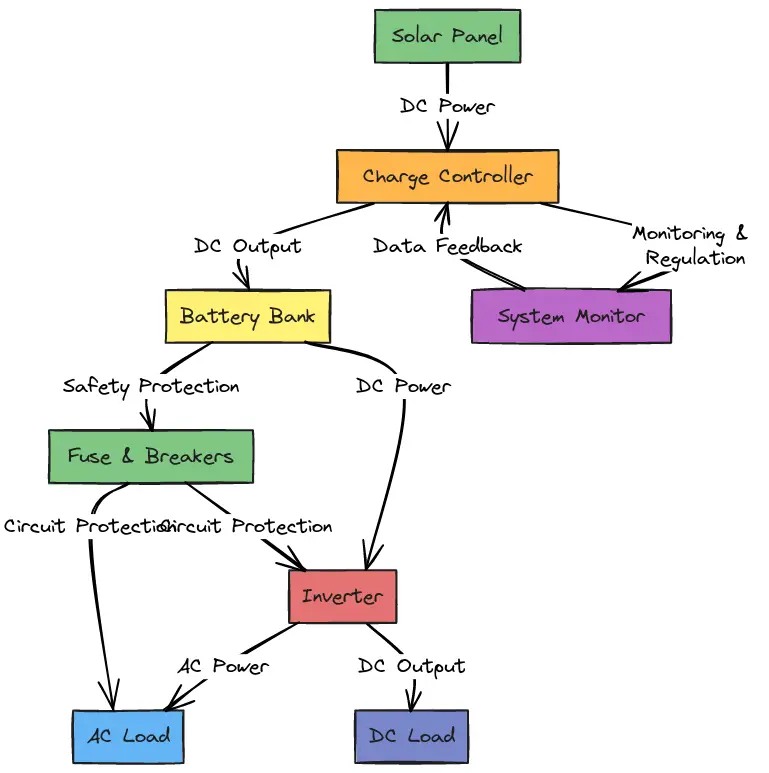
Illustration: Key components of a solar PV system (from solar cell to complete system). It shows solar panels, charge controller, battery bank, inverter, and the necessary disconnects and meters in a typical setup.
Components and Equipment Needed
Before diving into the wiring steps, make sure you have all necessary components and tools on hand. The table below lists the key equipment for a 4kW solar installation, along with typical specifications and notes (including where you might consider affiliate product links for recommended items like inverters or wiring kits):
Component
Specifications for 4kW System
Notes
Solar Panels
~10× 400W panels (total ≈4kW)
Typically wired in series/parallel to meet the system’s voltage and current requirements.
Used if you have multiple panel strings. Provides a single output and over-current protection for each string.
Charge Controller (MPPT)
~60–80A MPPT solar charge controller (for battery systems)
Regulates solar charging to the battery. Ex: a Renogy Rover 60A MPPT controller (ensure it supports your PV voltage and battery voltage) – great spot to link a recommended charge controller.
Converts DC to AC. Off-grid example: XYZ 4000W 48V Inverter (link to product); Grid-tie example: SMA Sunny Boy 4kW inverter or microinverters. Make sure it’s a pure sine wave unit for clean power.
PV wiring: 10 AWG PV-rated solar cable for panel strings . Battery/Inverter cabling: 2 AWG or 1/0 AWG copper battery cables; MC4 solar connectors for panel hook ups
Use UL-listed solar cables of appropriate gauge. Panels typically include MC4 connectors (rated ~30A, using 10 AWG wire). Battery-to-inverter cables carry high current (80–100A for 4kW at 48V) – large gauge (1/0 AWG is common) prevents overheating.
DC fuses/breakers for each PV string and between charge controller and battery; Appropriate AC breaker for inverter output
Protect wires from short circuits. Ex: use a fuse or breaker rated ~1.25× the max current. Many 4kW inverters recommend ~125A DC fuse on the battery line.
AC/DC disconnects lets you safely isolate the solar array. An AC disconnect (usually near the main panel for grid-tie) isolates the inverter from the grid. These are often code-required. Sizing the AC/DC Disconnect for Solar PV Systems greentechrenewables.com.
Tools for cutting cable, attaching lugs, tightening connections, and testing voltage. Always wear insulating gloves and eye protection during wiring.
Wiring an Off-Grid 4kW Solar System (Battery-Based)
If you are setting up an off-grid 4kW system (or a system with battery backup), follow these step-by-step wiring instructions. Always turn off all power sources (cover the panels or keep them disconnected, and ensure batteries and inverters are off) before making connections.
1. Plan the System Layout and Safety Measures
Carefully plan where each component will go: solar panels (often on roof or ground mount), combiner box, charge controller, batteries, inverter, and any disconnect switches. Ensure all components are appropriately rated for a 4kW system. At this stage:
Check local codes and permits: Even off-grid systems should follow electrical codes for safety. Plan for proper wire sizing, conduit, and breakers according to your local regulations.
Mount hardware securely: Install the solar panel racking/mounts according to the manufacturer’s instructions. Also mount the combiner box (if used), disconnect switches, and inverter unit on a wall or board where they will be protected from weather and easily accessible.
Safety first: Wear insulating gloves and use tools with insulated handles. Have a multimeter handy to verify voltages/polarity before final connections. Never work on live wires.
2. Wire the Solar Panels in Series/Parallel
Connect your solar panels to form a solar array that matches the input requirements of your charge controller (off-grid) or inverter (grid-tie). For a 4kW array, you likely have multiple panels:
Series vs. Parallel: Wiring panels in series adds their voltages, while wiring in parallel adds their currents. Often a combination is used. For example, you might wire 2 strings of 5 panels in series (each string ~ five panels × 40V ≈ 200V) and then connect those two strings in parallel. This could yield about 200V at ~20A per string, combining to ~40A at 200V. Ensure the configuration stays within your charge controller’s voltage and current limits.
Use MC4 connectors: Most panels come with MC4 connectors for easy series wiring. Connect the positive lead of the first panel to the negative lead of the next panel (for series wiring). When done, you’ll have a single positive and negative output for each string. Keep polarity consistent and double-check with a multimeter.
Combining multiple strings: If you have more than one string of panels, bring the leads from each string into a PV combiner box. The combiner box will parallel the strings – each string’s positive goes through its own fuse/breaker in the box, then they join to a common positive bus. Same for negatives (often a common negative bus bar). This outputs a single pair of positive/negative cables. Install the appropriate PV string fuses in the combiner for each string (typically rated ~15A-20A DC, depending on panel short-circuit current).
3. Install a DC Disconnect and Surge Protection (if required)
Between the solar array output and the charge controller, it’s good practice (and often code-required) to have a DC disconnect switch. This switch allows you to completely isolate the solar panels from the rest of the system for maintenance
. Mount the disconnect switch near the charge controller.
Wiring through the disconnect: Connect the positive output from the combiner box (or directly from panels if only one string) to one side of the DC disconnect switch. The other side of this switch goes to the input of your charge controller. Use appropriately thick wire (e.g., 8 AWG or 6 AWG for the run from combiner to controller, depending on current and distance). The negative bypasses the switch (you can connect negative directly from combiner output to the charge controller’s negative input, or through a negative bus bar if provided).
Surge protection: For higher-power systems, consider installing a surge protective device (SPD) on the PV input lines to protect against lightning or electrical surges. These are typically wired in parallel with the PV input (one end to positive, one to negative, and a ground).
4. Connect the Charge Controller
The MPPT charge controller is the device that takes the DC power from the solar array and properly charges the batteries. Wiring the controller involves connecting it to the PV array (done in step 3), the battery bank, and sometimes a load output:
PV input: As above, connect the PV positive (through the disconnect) and PV negative from the array into the charge controller’s solar input terminals. Ensure polarity is correct – positive to positive, negative to negative. The controller may have a digital display or LEDs that light up once it senses panel voltage (but do not connect panels to an active controller unless the battery is also connected, as many controllers require a battery reference to power on properly).
Battery output: Connect the charge controller’s battery terminals to the battery bank next. Use heavy-gauge cables (since at 4kW, the charge current can be substantial, e.g., ~60–80A). For a 48V battery bank, connect the controller’s “Battery +” to the positive terminal of the 48V bank, and “Battery –” to the negative terminal. Include a fuse on this line (e.g., a fuse or DC circuit breaker rated slightly above the controller’s max current, ~80–100A) on the positive lead, close to the battery. This protects the wiring in case of a short.
Ground the controller: Many charge controllers have a ground terminal. Bond it to the common ground (earth) of the system.
At this point, the solar panels can charge the battery bank via the controller. Double-check the charge controller’s manual for any specific initialization or settings (like system voltage selection, battery type, charging profiles). Many MPPT controllers auto-detect a 48V battery, but if yours needs configuring, do so before enabling charging.
5. Wire the Battery Bank
Your battery bank for a 4kW off-grid system is typically a 48V configuration (to keep currents manageable). For example, you might have four 12V batteries in series, or a single 48V lithium battery unit. Wiring the battery bank involves series or parallel connections (depending on your batteries) and hooking up system cables:
Series connection for higher voltage: If using multiple batteries (e.g., 12V units), connect them in series: Positive of Battery 1 to Negative of Battery 2, and so on, to get 48V total (12V × 4). This series string will have a free positive terminal at one end and a free negative at the other – those form the + and – of the whole bank.
Parallel (if needed for capacity): If you have multiple strings of batteries to increase amp-hour capacity, you can parallel those 48V strings. Use a proper bus bar or battery combiner so that each string’s output ties together to a common + and common –. Ensure each string is fused or has a circuit breaker to isolate it if one fails.
Battery connections: Use large gauge cables for battery interconnects and main output. A typical battery bank wire size is 1/0 AWG (one-aught) windynation.com, which can handle the high current draw of a 4kW inverter. Keep these cables as short as practical to minimize voltage drop and heating. Make solid connections using battery lugs and properly crimped terminals.
Fuse the battery bank: As mentioned, install a battery fuse or breaker on the main positive line that will run to the inverter. For a 4kW/48V system, a fuse around 100–125A is common (accounting for surges). This fuse should be in a holder near the battery. It protects against short-circuits feeding from the powerful battery.
CAUTION: When working with batteries, use extreme care. Even at 48V, a battery can deliver very high currents if shorted, leading to burns or fire. Use insulated tools and remove jewelry when connecting batteries. Double-check polarity: reversing battery connections to the charge controller or inverter can damage equipment.
6. Connect the Inverter (DC side)
With the battery bank in place, you can now connect the inverter. An off-grid inverter will have DC input cables or terminals for the battery connection, and AC output wires or terminals for powering your loads. Follow the inverter manufacturer’s manual closely. Here’s how to wire it:
DC input to inverter: Connect the inverter’s positive DC input to the battery bank’s main positive (through the fuse/breaker you installed in step 5). Connect the inverter’s negative DC input to the battery bank’s main negative. Use the same heavy gauge cable as used on the battery (2 AWG, 1/0 AWG, etc.) for these connectionssecondlifestorage.com. Make sure the DC disconnect/fuse is OPEN (off) while making these connections – you don’t want the inverter to power up until all wiring is done.
Grounding: Connect the inverter’s chassis ground to the common grounding system (ground rod/earth). Typically, a lug on the inverter is provided for equipment ground – use a suitably sized green/yellow copper conductor to tie it to your ground bus or rod.
Do not turn on yet: Ensure the inverter’s power switch is OFF before proceeding to the AC side wiring.
7. Wire the AC Output (Off-Grid)
For off-grid use, the inverter’s AC output can be wired to an AC subpanel that feeds your house circuits or specific loads. This subpanel is isolated from the utility grid (in a pure off-grid scenario). Wiring the AC side involves standard household wiring practices:
Inverter AC output: Most 4kW off-grid inverters provide either a single-phase 230V output or split-phase 120/240V output (depending on model). Connect appropriate gauge wires from the inverter’s AC terminals to your distribution panel. For a 4kW (4000W) output at 230V, the current is ~17A; at 120V it would be ~33A. Use at least #8 AWG or #6 AWG for a 30–60A capacity as needed (check the inverter manual for recommended wire size and breaker).
AC breaker: In the subpanel, connect the inverter output to a main breaker of suitable rating (e.g., 40A breaker for a 4kW, 120V inverter output). This breaker can serve as an AC disconnect for the inverter output and provides overload protection. From that subpanel, you can distribute power to various branch circuits (with their own breakers) as you would in a normal home panel.
Neutral and Ground: If the inverter has a bonded neutral, follow the instructions about bonding. Many off-grid inverters bond neutral to ground internally when not connected to a grid. If not bonded internally, you may need to bond the neutral bus to ground at the subpanel. Ensure only one neutral-ground bond in the system to avoid loops (commonly at the main panel or inverter, but not in multiple places). When in doubt, consult an electrician for proper grounding and bonding practices.
At this stage, your off-grid system wiring is essentially complete: panels → charge controller → batteries → inverter → AC loads. Do not turn on the system yet – first, complete the grounding and final safety checks below.
8. Grounding the System
Proper grounding is crucial for safety. All major components should be bonded to a common ground:
Ground rod: Install a ground rod (or use an existing one for the building) into the earth, near your equipment. Use a clamp to attach a copper grounding conductor. Commonly, #6 AWG copper or larger is used for grounding, but check local code for required size (it might depend on system size and lightning considerations).
Grounding connections: Connect the metal frame of each solar panel to the ground (many racks have ground lugs – run a copper wire through all panel frames and tie into the system ground). Ground the combiner box, charge controller (if it has a ground terminal), inverter chassis, and any metal enclosures (like conduit boxes). Ideally, all ground wires tie into a common ground bus bar, which then connects to the ground rod.
Equipment grounding conductor (EGC): The AC subpanel should also have a ground bus bonded to the ground rod. If your inverter’s AC output cable has a ground, connect it to the ground bus in the panel. This ensures any AC faults will trip breakers.
Grounding prevents stray voltages and provides a path to earth in case of lightning or faults. It’s a vital step – never skip grounding.
9. Final Checks and System Power-Up
With all wiring in place, go through a thorough inspection:
Verify connections: + and – polarities from panels to controller, controller to battery, battery to inverter, etc., are all correct. All terminal screws and lugs are tight.
Check fuses/breakers: All installed fuses and breakers are of proper rating and currently in the open (off) position. This includes PV string fuses, the PV disconnect, battery fuse, and AC breakers.
Controller settings: Program the charge controller for the correct battery type (if needed) and ensure it’s ready.
Initial power-up sequence: For off-grid, typically you connect the battery first, then energize the other components:
Close (turn on) the battery disconnect/breaker so the charge controller and inverter see the battery. The charge controller should power up (it draws from the battery) and likely show battery voltage. The inverter (if left OFF) may have a standby LED.
Next, close the PV disconnect to allow solar power into the charge controller. The controller should start to register incoming PV voltage/current and begin charging (if the sun is out).
Finally, turn ON the inverter. The inverter will draw from the battery (and indirectly from panels if they are charging) and produce AC power. Verify the inverter output voltage is correct (use a multimeter at an outlet or subpanel). Then close the AC subpanel breaker connecting the inverter, and you can turn on branch circuits or plug in appliances.
Monitor operation: Check that the battery is charging (the controller should indicate charging current). Also watch the inverter handle some loads – ensure it doesn’t trigger any error lights. In a 4kW system, try adding loads gradually (e.g., turn on a few appliances) to make sure everything runs smoothly without voltage drops or overheating cables.
Congratulations – the off-grid 4kW solar system should now be live, powering your loads from the sun and batteries!
Wiring a Grid-Tied 4kW Solar System (Grid-Interactive)
If your 4kW solar array will be grid-tied (feeding power into the utility grid through your home’s electrical system), the wiring setup differs from an off-grid system. Grid-tied systems typically do not use batteries or charge controllers. Instead, solar panels connect to a grid-tie inverter, which synchronizes with the utility and outputs AC power into your main service panel. Below are the key steps and considerations for a grid-tied 4kW solar system:
1. Use a Dedicated Grid-Tie Inverter
For a grid-interactive system, you must use an approved grid-tie inverter. This can be a single large string inverter (e.g., a 4kW central inverter) or multiple microinverters (attached to each panel). The inverter(s) will have built-in maximum power point tracking (MPPT) for the panels and safety features to shut down if the grid goes down (anti-islanding). Ensure the inverter is certified for grid connection per your region’s standards (e.g., UL 1741 in the US).
String inverter setup: If using one string inverter, plan the panel wiring as one or more strings that will connect to that inverter’s DC inputs. A 4kW inverter might have a voltage range (e.g., 150V to 450V) – so you could wire, say, 10 panels in series for ~350V. Check the inverter’s MPPT range and configure the series/parallel panel count accordingly.
Microinverter setup: If using microinverters, each panel (or pair of panels) will have its own small inverter mounted at the panel. The microinverters output AC, and they are all connected in parallel into an AC trunk line. In that case, the “wiring” on DC side is minimal (just panel to its microinverter), and the rest is AC wiring.
2. Panel Wiring and DC Disconnect (for String Inverters)
Wire the solar panels similarly as in the off-grid step: series strings to achieve the required DC voltage. If multiple strings are used, a combiner box might feed the inverter (though many string inverters have multiple inputs or string fusing built-in). Before the inverter, it’s recommended (and often required) to have a PV DC disconnect. This is usually integrated into the inverter or mounted beside it. It allows isolating the panels from the inverter greentechrenewables.com
.
Connect panels to inverter: Run PV cables from the array to the inverter location (through conduit for protection). Use appropriate gauge wire (typically 10 AWG PV wire is fine if the run isn’t long; higher if needed for longer distances or higher currents). If the inverter is outdoors near the panels, great; if it’s indoors, ensure to route cables safely through weatherproof conduit.
DC connections: Most grid-tie inverters have MC4 or similar connectors for input. You may just plug the string leads directly. If not, connect the positive from the array to the inverter’s positive DC terminal (through the DC disconnect switch), and negative to negative terminal. The inverter usually has internal fuses or will specify if external fusing is needed for multiple strings.
3. AC Connection to the Main Panel
The output of a grid-tie inverter is AC power that must be tied into your house’s electrical service (so that you can use the energy and/or send excess to the grid). This is done via an AC breaker in your main service panel (or subpanel) and an AC disconnect switch. Here’s how:
Inverter AC output wiring: The inverter will have AC output terminals (L, N, and Ground for single-phase, or two hots + ground for split-phase without neutral, depending on model). Use appropriately sized AC wiring (e.g., for 4kW at 240V, ~16–20A output, so 12 AWG or 10 AWG copper THHN conductors in conduit is typical). Connect these wires from the inverter to a dedicated double-pole breaker in your main electrical panel. For example, a 20A or 30A breaker at 240V might be used for a 4kW inverter – sized according to the inverter’s output current (with a 125% safety factor per code).
AC disconnect: Local code often requires an AC disconnect switch externally, within reach of the utility meter, so that firefighters or utility workers can shut off your solar feed. This is basically a switch that opens both hot conductors. It’s wired in series between the inverter and the connection to the main panelgreentechrenewables.com. In practice, sometimes the service panel’s breaker can count as a disconnect if it’s outside, but usually a separate outdoor-rated disconnect is installed.
Tie-in at panel: In the main panel, the solar breaker should be placed at the opposite end of the bus from the main breaker if possible (this is a code recommendation to reduce bus overloading). Connect the inverter’s hot leads to the breaker terminals, connect neutral (if used) to the neutral bar, and ground to the ground bar. Ensure the breaker is OFF until you’re ready to commission the system.
4. Metering and Approvals
Grid-tied systems require coordination with your utility company:
Net meter: Most utilities will swap your standard meter for a bidirectional net meter that can measure energy you export. Ensure this is in place or scheduled.
Inspection: After wiring, the system typically must be inspected by the local authority and approved before use. They will check that wiring is safe and meets code.
Interconnection agreement: It’s usually mandatory to have an interconnection agreement with your utility greenworld-energy.com. This means you’ve got permission to connect the solar system to the grid. Operating a grid-tie system without utility approval can be illegal and dangerous (for line workers). So be sure all paperwork (permits, agreements) is in order before turning on the system.
5. Commissioning the Grid-Tied System
Once all wiring is done and you have permission to operate:
Initial checks: Same as before, double-check all connections (DC polarity, AC wiring correctness, grounding). Ensure the PV disconnect and AC disconnect are open (off).
Sequence: Close the DC disconnect to let the panels feed the inverter. Most grid-tie inverters will power on and wait to sense the grid. Next, turn on the AC disconnect and the breaker to connect the inverter to the grid. The inverter should detect the grid voltage/frequency and begin exporting power after a short delay (many have a 60-second safety delay).
Monitoring: Observe the inverter’s display or indicators. It should show power output, and status as “selling” or “online”. Your home now will use solar power first, and any excess goes to the grid. Watch your utility meter – it may slow down or spin backwards when you’re exporting power.
During operation, the grid-tie inverter will automatically shut off if the grid loses power (this is a safety feature called anti-islanding). It will reconnect when grid power is restored and stable for a few minutes. There isn’t much user intervention needed day-to-day, aside from monitoring production.
Tip: For grid-tied setups, consider adding production monitoring equipment or using the inverter’s built-in monitoring (via WiFi/app) to keep track of how much energy your 4kW system produces.
Grid-Tied vs. Off-Grid Recap (Key Differences)
Batteries: Grid-tied systems do not use batteries for standard operation (unless it’s a hybrid system). Off-grid systems require batteries to store energy.
Charge Controller: Not needed in grid-tied, since the inverter handles MPPT. Off-grid needs a charge controller between panels and batteries.
Inverter Type: Off-grid inverter provides stand-alone AC output and often cannot synchronize with grid. Grid-tie inverters must sync with grid and have anti-islanding protection. They shut down when grid is off (for safety of line workers).
Safety Disconnects: Both systems use DC disconnects for the PV array. Grid-tie adds an AC disconnect to isolate from the utility greentechrenewables.com. Off-grid has an AC subpanel for isolated circuits, whereas grid-tie connects to the main service panel.
Permits and Code: Grid-tied installations absolutely require permits, inspection, and utility interconnection agreements greenworld-energy.com. Off-grid systems, while still subject to electrical codes, might have a bit more leeway if completely isolated, but permits may still be required for the installation. Always check local regulations.
By adding this dedicated grid-tie section, we ensure you understand how to wire a 4kW system in either configuration. If you plan a hybrid (grid-tie with battery backup), that essentially combines elements of both (a special inverter that can do both on-grid and off-grid, with batteries).
Conclusion and Safety Disclaimer
Wiring a 4kW solar system is a doable DIY project if you have the right knowledge and take proper precautions. Always follow the step-by-step process methodically, double-checking each connection. Use the recommended wire sizes (when in doubt, go thicker for safety and efficiency) and appropriate fuses/breakers to protect against electrical faults. We’ve indicated where you might incorporate useful components (with affiliate links to quality products) to help your installation.
Disclaimer:Electrical work can be dangerous. This guide is for educational purposes and assumes a basic proficiency with electrical systems. Always turn off power before working, and use proper safety gear. Adhere to all local building and electrical codes (e.g., NEC Article 690 for solar PV systems) and obtain any required permits and inspections
. If you are uncertain about any part of the installation, consult a licensed electrician or solar professional. The author and publisher of this guide are not responsible for any injuries, damages, or code violations.
By following this guide with a serious focus on safety and detail, you can successfully wire your 4kW solar system. Soon you’ll be enjoying clean solar power – either independently off-grid or by sending surplus energy back to the grid – all while knowing the installation has been done correctly and safely. Good luck with your solar project!
Guide to Cutting Your Electricity Bill with Solar Batteries: Tips, Tricks, and Techniques for 2025
Tired of seeing your electricity bill balloon like an overfed balloon animal? This guide is here to show you how to harness solar batteries’ power to shrink those bills down to size. In 2025, with a little know-how and a bit of wit, you can build your very own DIY solar battery system that keeps the lights on and the bills low.
Understand Your Energy Usage
Before you invest in a fancy solar battery, take a good look at your energy habits. Knowing when and how you use power is key to sizing your battery system correctly. If your household mostly runs during the day, you might not need a gargantuan battery backup.
Daily Average: Check your electricity bill for your average daily kWh usage.
Peak Hours: Note if most of your energy is consumed during the evening.
Capacity vs. Power Rating: Capacity is how much energy the battery stores, while power rating shows how quickly it can deliver energy. Take Advantage of Off-Peak Charging
Time-of-use (TOU) rates mean electricity costs more during peak hours and less during off-peak times. Here’s how to make them work in your favor:
Charge When It’s Cheap: Let your solar battery soak up the sun during the day and charge further from the grid during off-peak hours.
Smart Systems: Many modern batteries come with smart apps that optimize charging cycles automatically ( smart charging controllers).
Feature
Benefit
Off-Peak Charging
Lower costs by charging when rates are at their lowest
Smart Energy Apps
Real-time adjustments to maximize savings
Optimize Your Solar Battery Settings
Your solar battery won’t work its magic by itself. Adjusting its settings can make a significant difference:
Economic Mode: Prioritizes using stored power when grid rates spike.
Backup Mode: Reserves energy for those unexpected emergencies.
Experiment: Tweak these settings to find the perfect balance for your household.
Reduce Overall Energy Consumption
Even the best battery can only do so much if you’re burning energy like it’s going out of style. Consider these energy-saving measures:
Upgrade Appliances: Switch to energy-efficient LED bulbs and appliances.
Smart Plugs & Thermostats: Automate devices to run during sunny hours.
Regular Maintenance: Keep an eye on system performance and fine-tune as needed.
Leverage Solar Incentives and Rebates
Many governments and utility companies offer incentives that can reduce your initial costs. Take advantage of:
Tax Credits & Rebates: Federal and local programs can offset installation costs.
Special Financing: Look for financing options tailored to solar installations.
Incentive
Benefit
Federal Tax Credit
Deduct a percentage of installation costs
Local Rebates
Extra savings based on local policies
Monitor, Adjust, and Evolve
Once your system is running, keep a watchful eye on its performance. Regular monitoring and adjustments can lead to even greater savings over time. Stay informed about new rate structures or incentive programs to continually optimize your setup.
Standard Electrical Work Disclaimer
Disclaimer: Electrical work can be hazardous if you’re not properly trained. This guide is for educational purposes only and assumes a basic understanding of electrical systems. Always turn off all power sources before working on your system, wear appropriate safety gear, and adhere to local building and electrical codes. When in doubt, consult a licensed electrician or solar professional. The author and publisher are not responsible for any injuries, damages, or code violations resulting from your DIY project.
There you have it—a down-to-earth, detailed guide to cutting your electricity bill with solar batteries in 2025. Happy building, and may your savings grow as steadily as your newfound energy independence!
.separator {
border: none;
border-top: 2px solid black; /* Adjust thickness and color */
width: 50%; /* Set the width you want */
margin: 20px auto; /* Center the line and add spacing */
}
DIY Solar Panel Installation Guide: for 2025
Discover the best DIY Solar Panel Installation Guide techniques and tips for 2025. Learn practical advice to harness solar energy efficiently and sustainably.
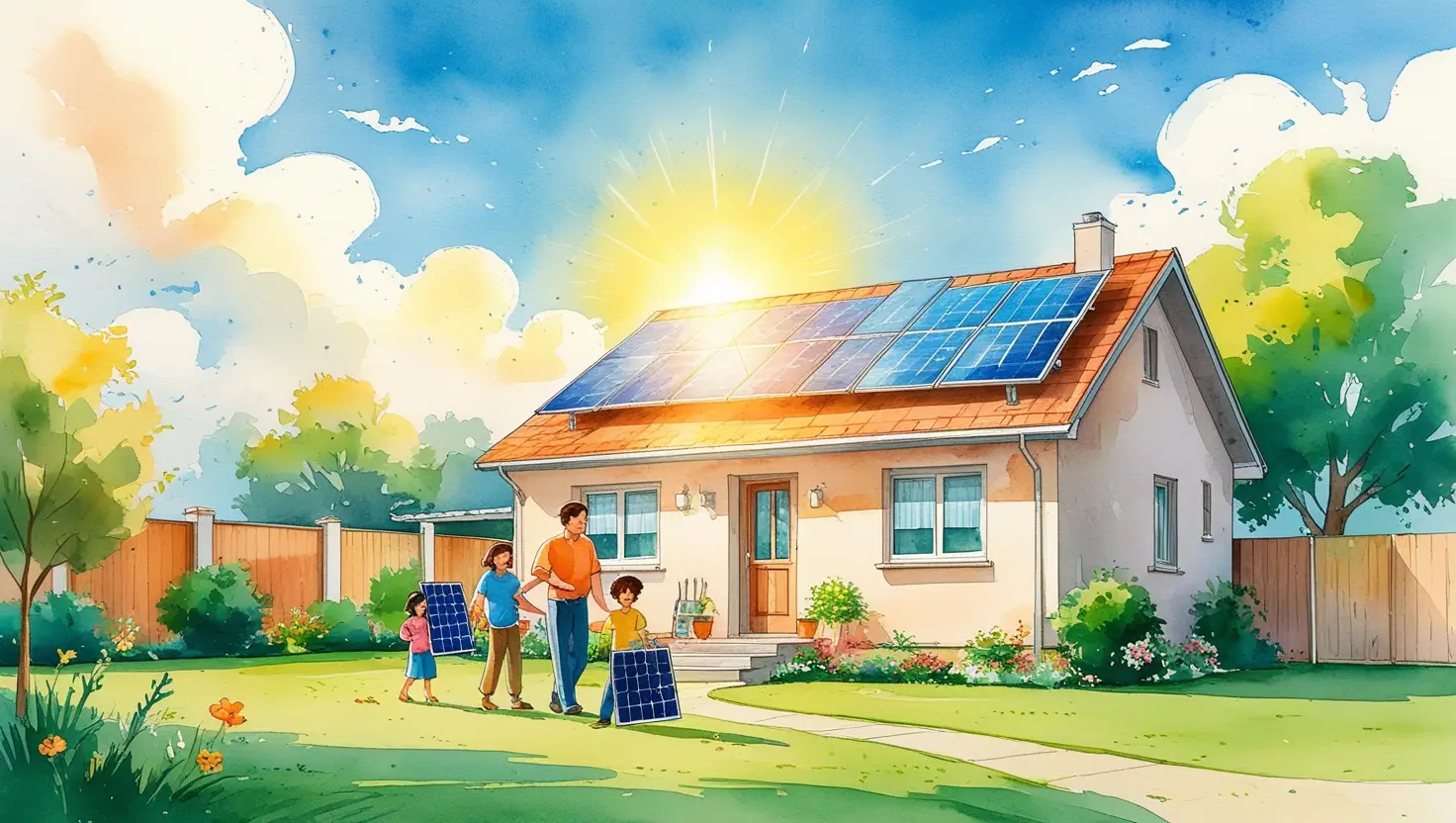
Did you know that installing solar panels can reduce your electricity bills by up to 70%? Whether you’re looking to save money or reduce your carbon footprint, this guide has everything you need to succeed in 2025.
Understanding DIY Solar Panel Installation
Installing solar panels yourself can be a rewarding and cost-saving endeavor, but it requires careful planning and execution. If you’re considering a DIY solar installation in 2025, staying up to date with the latest best practices will ensure a smoother process. From selecting the right equipment to ensuring proper installation, every step plays a crucial role in maximizing energy efficiency.
Choosing the Right Solar Panels
Selecting the right solar panels is one of the most critical decisions in your DIY installation. With advancements in solar technology, options like monocrystalline, polycrystalline, and thin-film panels each come with their own pros and cons. Monocrystalline panels are the most efficient but also the most expensive, while polycrystalline panels offer a budget-friendly alternative with slightly lower efficiency. Thin-film panels are lightweight and flexible, making them ideal for unconventional installations, but they may not generate as much power per square foot.
When choosing panels, consider factors like wattage, efficiency ratings, and warranty periods. In 2025, many brands are offering higher efficiency panels with improved durability, so take the time to research and invest in panels that align with your energy needs and budget.
Determining Your Energy Needs
Before installing solar panels, it’s essential to calculate your household’s energy consumption. Reviewing your past electricity bills will give you an estimate of your average daily and monthly usage. This step helps determine how many panels you’ll need to generate enough power to meet your needs.
Several online solar calculators are available to simplify this process, factoring in variables like your location, roof angle, and hours of sunlight per day. Understanding your energy needs will prevent overspending on unnecessary panels while ensuring you produce enough electricity to make the investment worthwhile.
Selecting the Right Location
The placement of your solar panels significantly affects their efficiency. Ideally, panels should be installed on a south-facing roof with minimal shading from trees, buildings, or other obstructions. If your roof isn’t suitable, consider ground-mounted systems, which allow for optimal positioning and easier maintenance.
In 2025, solar tracking systems are becoming more affordable, allowing panels to follow the sun’s movement for maximum energy absorption. If your budget allows, investing in a tracking system can increase your overall energy production.
DIY Solar Panel Installation Steps
1. Gathering the Necessary Equipment
Apart from solar panels, you’ll need an inverter, mounting hardware, wiring, and a charge controller if you’re setting up an off-grid system. Ensure all components are compatible and meet local electrical codes and safety standards.
2. Installing the Mounting System
Secure the solar panel mounting system onto your roof or ground location. This framework provides a stable base for your panels and should be properly anchored to withstand wind and weather conditions.
3. Placing and Securing the Panels
Carefully position and attach the solar panels to the mounting system using the provided brackets and fasteners. It’s crucial to align them correctly to maximize sunlight exposure.
4. Wiring the System
Connect the solar panels to the inverter, which converts the direct current (DC) electricity produced by the panels into usable alternating current (AC) power. Ensure all connections are secure and properly insulated to prevent electrical hazards.
5. Connecting to the Grid or Battery System
If you’re installing a grid-tied system, you’ll need to connect your inverter to your home’s electrical panel. This step may require approval from local utility companies. For off-grid systems, connect the inverter to a battery storage system to store excess energy for later use.
6. Testing and Monitoring
Once everything is connected, test the system to ensure it’s generating power correctly. Many modern inverters come with built-in monitoring apps, allowing you to track energy production in real time.
Safety Considerations for DIY Installations
Working with electricity and rooftop installations comes with inherent risks. To ensure safety:
Always turn off power before making electrical connections.
Use proper safety gear, including gloves, safety glasses, and a harness when working on roofs.
Double-check all wiring to prevent short circuits or fire hazards.
If uncertain about any step, consult a professional electrician.
Following these precautions can help prevent accidents and ensure a safe and effective installation.
Understanding Permits and Regulations
Before starting your DIY solar installation, check your local building codes, zoning laws, and utility company regulations. Many areas require permits and inspections to ensure compliance with safety standards. Some regions also offer incentives or tax credits for installing solar panels, so researching available rebates can help offset costs.
Maximizing Solar Panel Efficiency
To get the most out of your solar panels, regular maintenance is key. Keep panels clean and free of debris, as dirt and dust can reduce efficiency. Trimming nearby trees to prevent shading can significantly improve performance. Additionally, monitoring your system regularly will help detect any performance issues early, allowing for timely repairs.
Is a DIY Solar Installation Right for You?
While DIY solar panel installation can save money, it requires technical knowledge, time, and effort. If you’re comfortable with electrical work and construction, a DIY approach may be a great option. However, if you’re unsure about wiring or local regulations, hiring a professional installer might be a safer and more efficient choice.
By following these DIY solar installation tips for 2025, you can harness the power of the sun while reducing electricity costs and contributing to a sustainable future.
DIY Solar Panel Installation Guide is more than just an activity—it’s an opportunity to contribute to a sustainable future. Apply these tips, stay consistent, and see the results for yourself in 2025! Find out more….
Thinking about installing solar panels yourself? It’s a solid move—done right, you’ll cut energy bills, gain some energy independence, and future-proof your home against rising electricity costs. But let’s be honest: solar installation isn’t a weekend DIY project if you don’t know what you’re doing. Get it wrong, and you could fry your inverter, damage your roof, or worse—get electrocuted.
This guide walks you through everything: tools, wiring, installation steps, and the pitfalls to avoid. Let’s get stuck in.
1. Planning Your DIY Solar Installation
Assess Your Energy Needs
Before buying anything, figure out: ✔ Your daily energy consumption (Check your past 12 months of electricity bills and find your average kWh usage). ✔ Your peak power demand (How much power you need at any given time). ✔ Solar panel capacity needed (Use a solar calculator to estimate how many panels you’ll require based on your location and sun exposure).
💡 Quick Tip: If you’re unsure how much power you’ll generate, use a solar panel wattage estimator like PVWatts to get a ballpark figure based on your location.
Check Roof Suitability
Your roof needs to: ✅ Face South (Ideally) – But East and West-facing roofs still work. ✅ Be structurally sound – A weak or old roof might collapse under the weight of the system. ✅ Have minimal shading – Trees, chimneys, and nearby buildings reduce efficiency.
💡 Roof Not Ideal? Ground-mounted solar may be a better option.
Understand Local Permits & Grid Connection Rules
🔹 If connecting to the grid: You must check with your utility company about permits and interconnection rules. 🔹 If going off-grid: You’ll need battery storage and an off-grid inverter to keep things running when the sun isn’t shining. 🔹 Check for incentives: Government tax credits and rebates can save you thousands—visit Energy.gov for the latest.
🛑 DO NOT skip safety gear: rubber-soled shoes, safety harness, and non-conductive gloves are essential.
Core Solar System Components
✔ Solar Panels (Monocrystalline for efficiency, Polycrystalline for budget-friendly systems) ✔ Mounting Hardware (Rails, brackets, flashing, bolts) ✔ Solar Inverter (Converts DC power to AC) ✔ Battery Bank (Optional) – For storing excess energy (Tesla Powerwall possible affiliate link). ✔Charge Controller (For battery-based systems) ✔ Electrical Wiring & Connectors (MC4 cables, grounding wire, conduit pipes)
💡 Pro Tip: Use thicker cables (lower gauge) for longer wiring runs to reduce power loss.
3. Step-by-Step Solar Panel Installation
Step 1: Plan & Mark the Layout
Use a chalk line to mark panel placement.
Ensure optimal sun exposure (tilt angle should match your latitude).
Step 2: Install the Mounting System
Secure mounting brackets to roof rafters (not just the plywood sheathing).
Use lag bolts and seal all holes with weatherproofing to prevent leaks.
🔹 Avoid: Bolting directly into shingles without proper flashing—it’ll cause roof leaks.
Step 3: Attach Solar Panels
Mount panels securely onto the rails using clamps.
Keep 1-inch gaps between panels for airflow.
🔹 Avoid: Over-tightening clamps—panels expand/contract with temperature changes.
Step 4: Connect the Wiring
Series Connection (Higher voltage, fewer amps, ideal for grid-tied systems).
Parallel Connection (Lower voltage, higher amps, best for battery setups).
🛠 Wiring Steps: ✅ Connect solar panel MC4 connectors to each other. ✅ Run DC wiring from panels to the inverter. ✅ Connect the inverter to your breaker panel (AC side). ✅ Ground the system using a copper grounding rod (prevents electrical faults).
💡 Pro Tip: Use UV-resistant conduit for outdoor wiring protection.
Step 5: Install the Inverter & Battery (If Applicable)
Grid-tied system? Mount the inverter near the electrical panel.
Off-grid system? Connect the inverter to battery storage first, then run the AC output to your house.
Use disconnect switches for safety.
Step 6: Connect to the Grid (If Required)
Your utility company may require an inspection before connection.
Once approved, turn on the inverter and monitor power generation.
🔹 Avoid: Connecting directly without approval—you could feed electricity back into the grid unsafely.
4. Testing & Monitoring Your Solar System
✔ Turn on the system and check your inverter’s display for proper operation. ✔ Use a multimeter to test voltage and amperage at panel output. ✔ Monitor performance using an app if your inverter supports WiFi/Bluetooth.
💡 Common Issues & Fixes: ⚡ Low power output? Check for shade or loose wiring. ⚡ Inverter errors? Restart the system and check for error codes.
5. Maintenance & Troubleshooting
✅ Clean panels every 6 months (Dust reduces efficiency). ✅ Check wiring yearly for loose connections. ✅ Monitor power output—sudden drops indicate a problem.
🔹 Avoid: Pressure washers or abrasive cleaners—stick to a soft brush & water.
Final Thoughts: Is DIY Solar Installation Worth It?
✔ If you’re handy with tools and comfortable with electrical work → Yes, DIY solar can save you thousands. ❌ If you’re unsure about wiring and grid connections → Hire a licensed electrician to handle the dangerous parts.
Either way, solar is a smart investment—just make sure you install it right the first time.
🔹 Need solar equipment? Check out the best solar panels & accessories here . 🔹 Want more DIY energy projects? Read [How to Build a DIY Battery Backup System].